How to Remove Exposed API Keys From Frontend Code
- Focus
- Fix Guide
- Risk
- Critical
- Stack
- Supabase/Next.js
- Detection
- Ubserve Runtime Simulation

A step-by-step fix guide for API keys, admin tokens, and service credentials that leaked into the browser during AI-assisted development.
If a privileged key reaches the client bundle, the fix is not to hide it better. The fix is to remove the privilege from the browser entirely.




Secure your vibe-coded app with Ubserve
- ✓Takes less than 60 seconds
- ✓100+ security checks run through your app
- ✓Plain English explanations for each issue
- ✓AI fix prompts for every issue
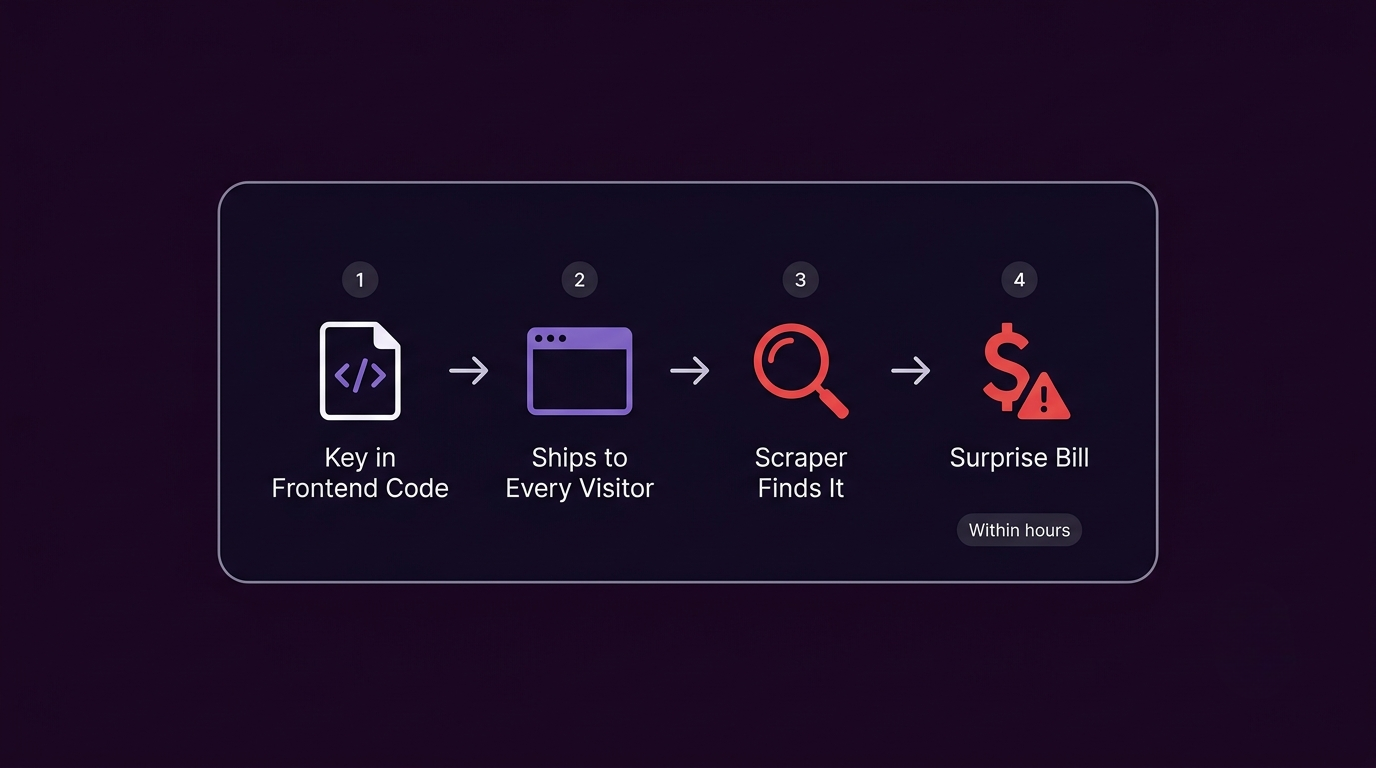
When an AI agent wants the feature to work quickly, it often chooses the shortest path: put the key where the code runs.
That is how privileged credentials end up inside frontend helpers, client SDK wrappers, and hydration payloads.
The pattern I see most often when scanning AI-built apps is not a developer carelessly hardcoding a key, it is a NEXT_PUBLIC_ prefix that was added to make an environment variable accessible during development, and never removed before the production deploy. The variable name looks fine in the codebase. The key is sitting in every visitor's browser. Two of the most common specific cases we see are Supabase's service role key and Stripe's secret key shipping this exact way.
Find the leak first
Search for:
NEXT_PUBLIC_apiKeyservice_rolesk_live_Bearer- internal vendor secrets
One recurring edge case looks like this:
export const analyticsClient = new VendorClient({
  apiKey: process.env.NEXT_PUBLIC_INTERNAL_ANALYTICS_KEY!,
});
The key may not look critical, but if it enables broad read or write access, it does not belong in the client.
Move the privileged operation behind a server boundary
The browser should call your server. Your server should call the privileged upstream.
export async function POST(request: Request) {
  const body = await request.json();

  const response = await fetch("https://api.vendor.com/events", {
    method: "POST",
    headers: {
      Authorization: `Bearer ${process.env.INTERNAL_ANALYTICS_KEY}`,
      "Content-Type": "application/json",
    },
    body: JSON.stringify(body),
  });

  return Response.json(await response.json());
}
Now the browser sends data, but not privilege. The old design let the secret cross straight into the browser; the fixed design keeps it entirely server-side, the browser never holds anything an attacker could replay.
Check hydration and config objects
Secrets do not only leak from obvious env usage. They also leak when teams serialize “config” into the client to simplify setup.
Review:
window.__APP_CONFIG__- JSON blobs in script tags
- serialized settings in layouts
- debug panels and admin pages
Rotate the secret after fixing the code
If a privileged key was exposed in the bundle, assume it was compromised. The correct sequence is:
- remove it from the client
- deploy the fix
- rotate the key
- verify the old key no longer works
Reclassify keys correctly
Treat keys as one of three types:
- public identifiers
- scoped publishable browser keys
- privileged server-only secrets
AI-generated code tends to collapse those distinctions. Your fix needs to restore them. If a key has already leaked and you're not sure what to do first, see our 10-minute exposed API key action plan.
Run a free URL scan. If it finds issues, paid plans unlock the full report, exact AI fix prompts, PDF export, and deeper audit coverage.
About the author

I'm Samuel, known online as Mr. Ballaz. I build Ubserve, a security scanner for apps built with AI tools like Cursor, Bolt, Lovable, and Supabase. Before Ubserve, I did manual security audits by hand — checking auth, exposed keys, and RLS policies one by one. Ubserve is that manual audit, automated, running in under 60 seconds instead of days.
Related resources
FAQs
Is an obfuscated key in the bundle safe enough?+
What keys are okay in frontend code?+
How do I find every exposed API key in my app?+
Do I need to rotate a key just because it was briefly exposed?+
Turn this resource into a real security check.
Review the guidance, then run the free scan to see whether this issue is actually exploitable in your app, no signup required.