What Is Row Level Security (RLS)?
- Focus
- Glossary
- Risk
- High
- Stack
- Supabase
- Detection
- Ubserve Runtime Simulation
Row Level Security (RLS) is a database authorization control that checks access one row at a time, and how to verify it's actually enforced, not just enabled.
Here's exactly how RLS works, how to turn it on in Supabase, and the specific ways policies fail silently even when they're enabled.




Secure your vibe-coded app with Ubserve
- ✓Takes less than 60 seconds
- ✓100+ security checks run through your app
- ✓Plain English explanations for each issue
- ✓AI fix prompts for every issue
What Is Row Level Security (RLS)?
Row Level Security (RLS) is a database authorization control that checks access one row at a time. It keeps tenant data protected when app-layer validation is incomplete, even if API routes or frontend checks fail.
RLS matters because API logic can be incomplete or drift over time, while data still needs hard boundaries. If policy conditions are correct, unauthorized rows remain invisible even when higher application layers make mistakes.
A simple analogy: think of a filing room where each folder has an automatic lock tied to the employee badge. Even if someone enters the room, they still cannot open folders they do not own.
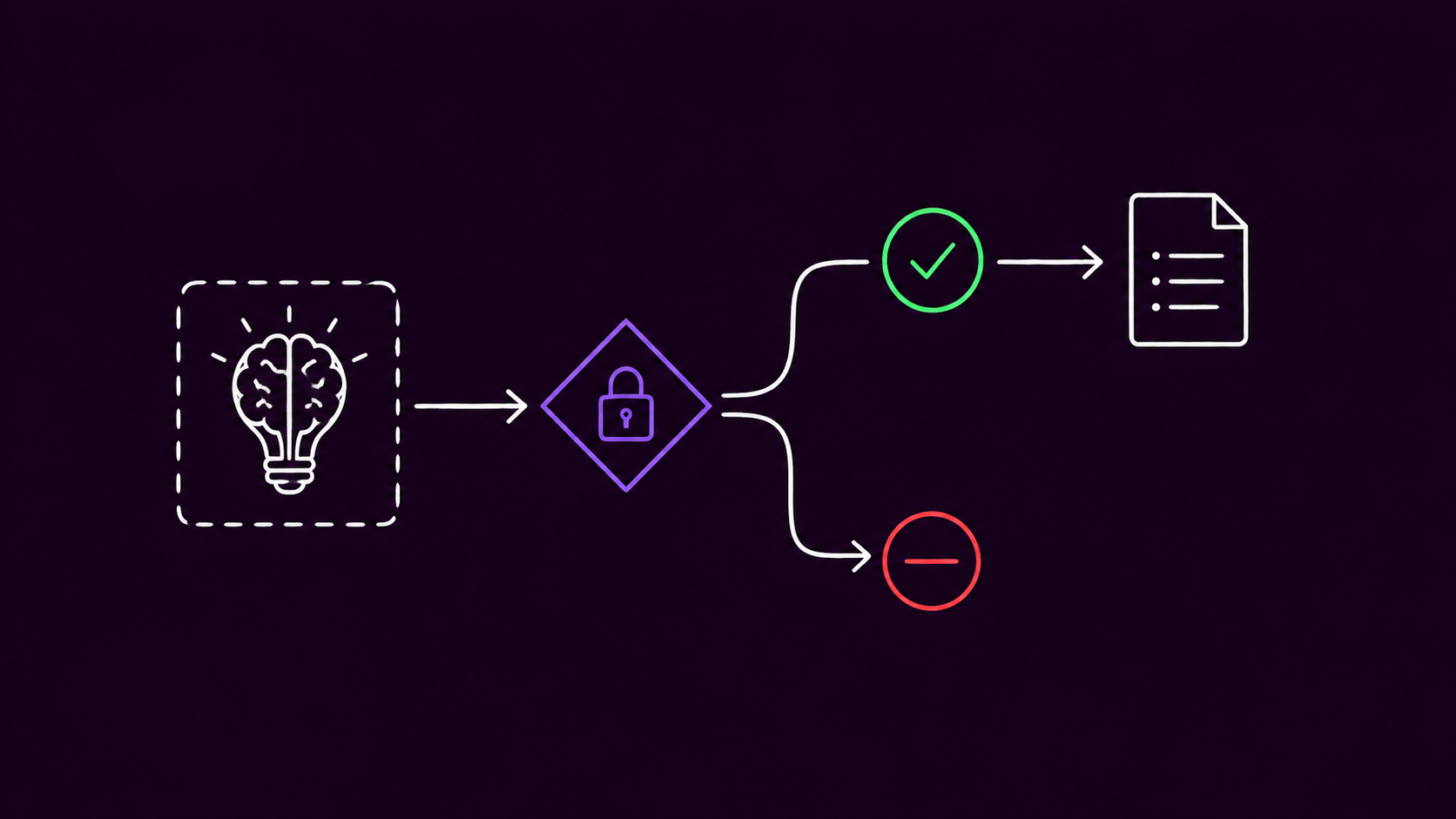
Every read or write passes through this gate: identity context goes in, the policy evaluates it against the row being requested, and the row comes back either visible or blocked, one row at a time.
How to Turn On RLS in Supabase
Enable it per table with one statement:
alter table your_table enable row level security;
The part beginners get wrong: RLS is default-deny. The instant it's enabled, every row on that table becomes invisible to every role, including your own app, until you add a policy that explicitly allows access. Enabling RLS with zero policies doesn't leave things "half-protected", it locks the table completely.
In the dashboard, the same toggle lives in two places: Table Editor → select a table → the "RLS disabled" banner, or Authentication → Policies → select a table. Either path enables the same setting; the Policies tab is also where you write the actual policy afterward (see the working example below), which is the step that gets missed. See Supabase's official RLS documentation and the Postgres RLS reference for the full policy syntax.
RLS glossary table
| Term | Class | Common failure mode |
|---|---|---|
| Row Level Security (RLS) | Database Authorization Control | Always-true predicate, missing tenant scope |
| RLS Drift | Configuration Decay | Schema changes outpace policy updates |
Common ways RLS policies fail
Ubserve Internal Audit data (Q1 2026) shows 12.5% of AI-generated Supabase RLS policies contain a Shadow Leak pattern, predicate logic that compiles cleanly but permits cross-tenant reads under edge conditions. That's the AI-specific failure. The following four are failures anyone can hit, AI-generated code or not:
- Silent write failures. When a write is blocked by policy, PostgREST usually returns an empty result, not an access-denied error. It looks like the request did nothing, not that it was rejected, so this gets mistaken for a bug elsewhere.
- Type mismatch in the comparison.
auth.uid()returns a UUID. If the column it's compared against istext, or cast inconsistently,auth.uid() = idsilently evaluates false on every row instead of erroring. - Missing INSERT/UPDATE/DELETE policies. A table with only a SELECT policy lets users read data but not write any, which usually surfaces as a confusing "nothing saves" bug rather than an obvious permissions error.
- Wrong column name in the predicate. A policy checking
owner_idwhen the table's actual column isuser_idcompiles fine and passes review, then fails (or worse, passes open) the first time it runs against real data. - USING without WITH CHECK on writes.
USINGcontrols which rows a user can see;WITH CHECKcontrols what values they're allowed to write. A write policy with onlyUSINGlets a user overwrite any column on a row to any value, as long as they could see that row at all, since nothing validates the new data being written.
Wrong vs right policy logic
-- WRONG: always-true predicate
create policy "Read tasks"
on tasks
for select
using (team_id = team_id);
-- RIGHT: tenant + actor ownership scope
create policy "Read own tenant tasks"
on tasks
for select
using (
  tenant_id = current_setting('request.jwt.claim.tenant_id', true)::uuid
  and owner_user_id = auth.uid()
);
Copy-Paste Fix Prompt for Cursor/Claude
Audit my Supabase RLS for tenant isolation and ownership correctness.
1. Identify all tables with RLS enabled but weak predicates (always-true, role-only, or missing tenant scoping).
2. For each vulnerable table, generate corrected policies that enforce:
   - auth.uid() ownership checks where applicable
   - tenant_id claim matching for multi-tenant tables
   - explicit INSERT/UPDATE/DELETE separation
3. Add SQL migration scripts with rollback statements.
4. Add a test plan with positive and negative authorization cases using UUID tenant and user fixtures.
Return only executable SQL + test cases.
Practical implementation checklist
- Enable RLS before writing policies, and expect the table to be fully locked until a policy exists.
- Ensure every exposed table has RLS enabled.
- Separate
SELECT,INSERT,UPDATE,DELETEpolicies, don't assume one covers the rest. - Match column types on both sides of every comparison (
auth.uid()is a UUID). - Validate tenant claim casting and null-handling explicitly.
- Re-test policies after schema migrations to catch RLS Drift.
- Test from the client SDK with the anon or authenticated key, not the SQL Editor. The SQL Editor runs as a superuser role that bypasses RLS entirely, so a query that "works" there proves nothing about what a real client can access.
RLS must be designed as code, checked with real authenticated requests, and re-verified after every schema change, not assumed correct because it's toggled on. Ubserve's authenticated scan checks exactly this: sign in as two separate test accounts and it compares live API responses to confirm one account's data doesn't leak into the other's, not just whether RLS is toggled on. Run a free scan.
About the author

I'm Samuel, known online as Mr. Ballaz. I build Ubserve, a security scanner for apps built with AI tools like Cursor, Bolt, Lovable, and Supabase. Before Ubserve, I did manual security audits by hand — checking auth, exposed keys, and RLS policies one by one. Ubserve is that manual audit, automated, running in under 60 seconds instead of days.
Related resources
How Ubserve Applies This in Real Scans
Ubserve treats What Is Row Level Security (RLS)? as a production risk, not a theory term. Our runtime simulation maps this control to attacker paths in auth, data access, and API behavior, then returns fix-ready guidance tied to your stack. OWASP-style principles are used as the baseline, but we prioritize what is actually exploitable in your live flow.
Runtime exploit simulation + behavioral authorization checks.
Clear proof path showing where trust boundaries fail.
AI-ready fix prompts and implementation-level patch guidance.
FAQs
What is Row Level Security in one sentence?+
Can RLS replace API authorization?+
Why do AI-built apps fail with RLS enabled?+
Does enabling RLS with no policies block all access?+
Why does my Supabase update return no error but nothing changes?+
Why does auth.uid() = id never match in my policy?+
Want Ubserve to test this risk in your app?
Run a scan and get attacker-first validation, exploit evidence, and fix guidance mapped to what is row level security (rls)?.